


Cheap Hotels・Hotels70
3.691.00 Reviews
App Specs
- Version
- 3.0.16
- Updated On
- License
- Free
- Downloads
- 500,000+
- Developer
- Booking70 - Flights, Hotels, Rental Cars
- Categories
- Travel & Local
- Platform
- Android
Screenshots




 Analysis by AppCompare
When I need a place to stay without spending ages comparing options, I want a hotel search to make the next step clearer—not simply show me a low number and leave me to guess what it means. Cheap Hotels・Hotels70 is built around finding and comparing hotel prices, and its appeal is easiest to see when I treat it as a starting point for a practical search rather than a guarantee that every result is the best choice.
This is a free travel and local app from Booking70 - Flights, Hotels, Rental Cars. It has an average rating of 3.6 from around 1,100 ratings, and more than 500,000 installs. Those figures suggest that plenty of travelers have tried it, while the middling average is a useful reminder to judge the experience against your own needs instead of assuming it will suit everyone. It is rated for everyone, so its audience is broad, but the core use is specific: comparing hotel options when price and convenience matter.
How the hotel search fits real trips
I use hotel comparisons most profitably before I’ve settled on one neighborhood or property, when the real question is what fits the trip rather than which listing has the lowest price. A quick shortlist can expose trade-offs between distance, timing, and cost that are easy to miss when browsing one hotel at a time. From there, the next step is checking whether each option works for the actual arrival and stay.
Current state: a useful starting point, not a booking shortcut
The app’s central value is straightforward: bring hotel price comparisons into one place so I can begin narrowing down where to stay. That can save time when I’m still deciding between neighborhoods or trying to establish whether a trip is affordable. I would use it to assemble a shortlist, then check the details that determine whether a room actually works for me: location, room arrangement, cancellation terms, and the final amount shown before booking.
That distinction matters because “cheap” is only useful when the stay fits the trip. A room far from the places I need to visit may cost less but add time and transport expense. A low nightly rate can also be less attractive if the dates, occupancy, or cancellation conditions do not match my plans. I recommend comparing like with like: use the same dates and number of guests, and judge the total stay rather than the first price that catches your eye.
What the version history can—and cannot—tell you
The current version is 3.0.13, and the app was released on October 26, 2022. That gives me a concrete sense of its age and current version, but it does not by itself explain which features changed between releases. I would not treat a version number as evidence that a particular search tool or booking step has recently been improved. For a traveler, the practical test is whether the current app handles your search clearly and whether the available hotel information answers your questions before you commit.
For someone who has used an earlier release, a new version can matter if it resolves a problem they encountered, but I would check the app’s present behavior directly rather than assume that an update changed a specific workflow. If you are considering installing it for a trip, the more useful questions are whether it finds relevant options for your dates, whether results are easy to compare, and whether you can verify the booking conditions before paying.
Worth Reading Before You Choose

Flipboard Shows What News Apps Must Do Beyond the Feed

Switching to Android Auto Means Rethinking Your Driving Routine

Google Calendar Makes a Crowded Week Easier to Manage

Ludo King Makes the Most of the Minutes Between Plans

Baby Panda World Brings Quick Play to Modern Phones, but Its Game Library Feels Busy

ESPN’s Live Game View Makes Following Close Games Easier
Who benefits most from comparing prices
I see the best fit for travelers who have some flexibility and want a quick way to explore hotel costs before settling on a plan. If I’m visiting a city for a short stay, I can compare possible areas first, then weigh a cheaper room farther out against a pricier one closer to my main destination. It can also help when a trip is taking shape but the hotel budget is still uncertain: seeing a range of options gives me a more grounded starting point than choosing a lodging budget from guesswork.
A realistic example is a traveler whose train arrives late and who needs a room for one night before continuing the next morning. I would search for the date and location, compare the options, and pay particular attention to how far each place is from the station and whether the arrival arrangements suit a late check-in. A lower price is not a win if reaching the hotel becomes difficult after a tiring journey. The useful decision is the least expensive option that still works for the actual schedule.
By contrast, I would not rely on a price-comparison app alone when a trip depends on specialized lodging needs, such as a particular room setup or carefully coordinated accessibility arrangements. In that situation, I would verify those requirements directly with the property before booking. The same goes for complex, multi-stop travel: a general hotel search can help with discovery, but it may not replace the careful coordination that a complicated itinerary requires.
How it compares with other ways to book
Compared with opening hotel websites one by one, a comparison app can make early research less tedious. Its strongest role is helping me see alternatives and decide which properties deserve a closer look. A hotel’s own booking channel may be the better final stop when I need to confirm a specific room detail, understand a property’s terms, or ask a question before committing. I treat comparison and verification as two steps, not competing choices.
Compared with a broad travel-booking service, a hotel-focused search is more appealing when accommodation is the only part of the trip I need to solve. If I also need to coordinate flights, transport, and other reservations, I may prefer a service that manages those pieces together. The right choice depends on the task: I would use Hotels70 to investigate hotel prices, then choose whichever booking path gives me the clearest conditions for the room I want.
Small checks that prevent avoidable booking mistakes
One useful habit is to compare a few options that are genuinely equivalent instead of chasing the lowest displayed figure. Keep the dates, guest count, and basic location needs consistent. Then check whether the quoted amount covers the stay you intend to book and whether the cancellation terms fit how certain your plans are. This takes slightly longer than tapping the first bargain, but it makes the comparison meaningful.
I would also separate the research stage from the commitment stage. First, save or note a short list of plausible places and compare their locations against the reason for the trip. Then revisit the strongest candidate and read the booking details carefully. This workflow is especially useful for a one-night stop: a few minutes spent checking transport and arrival practicality can matter more than a small difference in the nightly price.
For a group or family, I would confirm the room configuration and occupancy details rather than assume that a low rate covers everyone comfortably. For a work trip, I would prioritize the hotel’s relationship to the meeting location and the reliability of the schedule over a small saving. In both cases, the comparison is valuable only when I use criteria that reflect the trip, not just the price order.
Where I would be cautious
A comparison result is not the same thing as a complete picture of a stay. Search tools can help surface options, but I still need to check what is included, whether the location is convenient, and what happens if my plans change. I would avoid making a decision from a price alone, especially for a nonrefundable stay or a trip with uncertain timing. When a detail could make or break the booking, direct confirmation is the safer choice.
The rating gives another reason to keep expectations measured. An average of 3.6 is neither a reason to dismiss the app nor a promise of a flawless experience. I would use it for the task it is meant to support—hotel price comparison—and assess whether it saves me effort on my own searches. If I need a highly polished end-to-end trip planner or extensive control over a complicated itinerary, I would compare it with broader travel tools instead.
Before installing, it is also worth checking that your device can run it: the minimum operating system is Android 8.0. The app is free, which makes it easy to try for a specific search without paying an upfront download price. I would still make the booking decision based on the room details and terms presented during the process, not on the fact that the search app itself costs nothing.
What I would watch as a traveler
For existing users, the useful measure of future changes is not simply a higher version number; it is whether searching, comparing, and understanding booking terms becomes clearer in day-to-day use. I would pay attention to whether results make it easy to distinguish genuinely comparable rooms and whether the route from research to a confident booking feels straightforward. Those are the details that affect a traveler more than a cosmetic change.
For new users, I would start with a simple search for a real trip rather than exploring without a purpose. Try the dates and area you actually need, shortlist options that meet your practical requirements, and verify the final terms before reserving. If the results help you make that decision with less effort, the app is doing useful work; if you find yourself repeatedly checking another service to understand the basics, that is a sign to use a different route for that booking.
All About Convenience
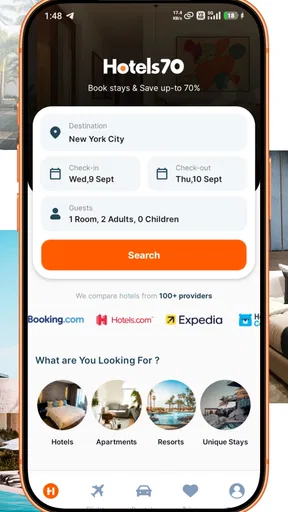
Cheap Hotels・Hotels70 is designed with user convenience at its core. From the moment you open the app, you’re greeted with a sleek interface that doesn’t overwhelm you with unnecessary clutter. The design is straightforward, making navigation a breeze, even for those who aren't exactly tech-savvy. The app focuses on providing a seamless experience where you can find, compare, and book hotels without hassle.
One of the coolest features is the location-based search. This nifty tool uses your current location to suggest nearby hotels, which is perfect when you’re in a new city and need to find a place stat. Plus, the map view is like your trusty sidekick, letting you see where each hotel is located relative to points of interest and transportation hubs.
Deals That Keep Your Wallet Happy
If you’re like me and love snagging a good deal, you’ll appreciate the app’s commitment to affordability. Cheap Hotels・Hotels70 consistently scours the web for the best prices, ensuring you’re not overpaying for a night’s stay. It’s like having a personal bargain hunter right in your pocket!
The app also features a section dedicated to exclusive offers and last-minute deals. This is where the magic happens. If you’re flexible with your plans, you can often find killer discounts on rooms that would otherwise be out of budget. It’s practically a steal!
User Reviews: A Trusty Guide
Now, I’m a bit of a review junkie. I love diving into what other people have to say before making a decision, and this app doesn’t disappoint. The user reviews on Cheap Hotels・Hotels70 are detailed and genuine, often peppered with tips and advice from travelers just like us.
The reviews help paint a picture of what to expect beyond the glossy photos and descriptions. Whether it’s about the cleanliness, service, or even the breakfast spread, you get a well-rounded view of each option. It’s like having a chat with a friend who’s already been there.
Booking Made Simple
Booking a hotel through the app is as easy as pie. Once you’ve settled on a place, you can complete your booking in just a few taps. The app securely stores your payment information, making future transactions even quicker. And if plans change, the cancellation policies are clearly outlined, so there are no nasty surprises.
For those who travel frequently, the app’s ability to save your preferences and previous searches is a huge plus. It remembers what you like, making subsequent searches even faster. It’s like the app knows you better with each use.
In a Nutshell
So, is Cheap Hotels・Hotels70 worth downloading? Absolutely! It’s an essential tool for anyone looking to travel on a budget without sacrificing comfort. The combination of great deals, user-friendly design, and insightful reviews makes it a standout in a crowded market. Whether you’re a spontaneous traveler or someone who plans meticulously, this app will have your back.
Next time you hit the road, give Cheap Hotels・Hotels70 a spin. It might just become your new travel buddy, ensuring you get the best bang for your buck every time. Happy travels!
Pros
- User-friendly interface for easy navigation.
- Extensive list of hotels with user reviews.
- Regular updates with new deals and offers.
- Secure payment options for peace of mind.
- Available in multiple languages for accessibility.
Cons
- Limited customer support response time.
- Occasional app crashes on older devices.
- Requires stable internet for best performance.
- Some features locked behind premium version.
- In-app ads can be intrusive at times.
FAQs for Cheap Hotels・Hotels70
What is Cheap Hotels・Hotels70, and how does it work?
Cheap Hotels・Hotels70 is a travel app designed to help users find and book affordable hotel accommodations worldwide. It aggregates data from various hotel booking platforms, allowing users to compare prices, read reviews, and access exclusive deals. With its user-friendly interface, you can quickly search for hotels by location, date, and price range.
Are there any hidden fees when booking through Cheap Hotels・Hotels70?
No, Cheap Hotels・Hotels70 is transparent about pricing. The app displays the total cost upfront, including taxes and fees, so you know exactly what you will pay before booking. However, it's always a good idea to review the booking details for any specific hotel policies or additional charges that may apply.
Is Cheap Hotels・Hotels70 available on both Android and iOS devices?
Yes, Cheap Hotels・Hotels70 is available for download on both Android and iOS platforms. The app can be found on the Google Play Store for Android users and the Apple App Store for iOS users. It is designed to provide a seamless experience across all devices, ensuring easy access to hotel deals wherever you are.
Can I cancel or modify my booking through Cheap Hotels・Hotels70?
Yes, you can cancel or modify your booking through the app, but it depends on the hotel's cancellation policy. Cheap Hotels・Hotels70 provides options to manage your bookings directly within the app. It's important to check the specific terms and conditions of each booking, as cancellation policies can vary by hotel.
Does Cheap Hotels・Hotels70 offer customer support if I encounter issues?
Absolutely, Cheap Hotels・Hotels70 offers customer support to assist with any issues you might encounter, such as booking errors or account questions. You can contact their support team through the app via chat or email. Their goal is to ensure a smooth and satisfactory experience for all users.


